

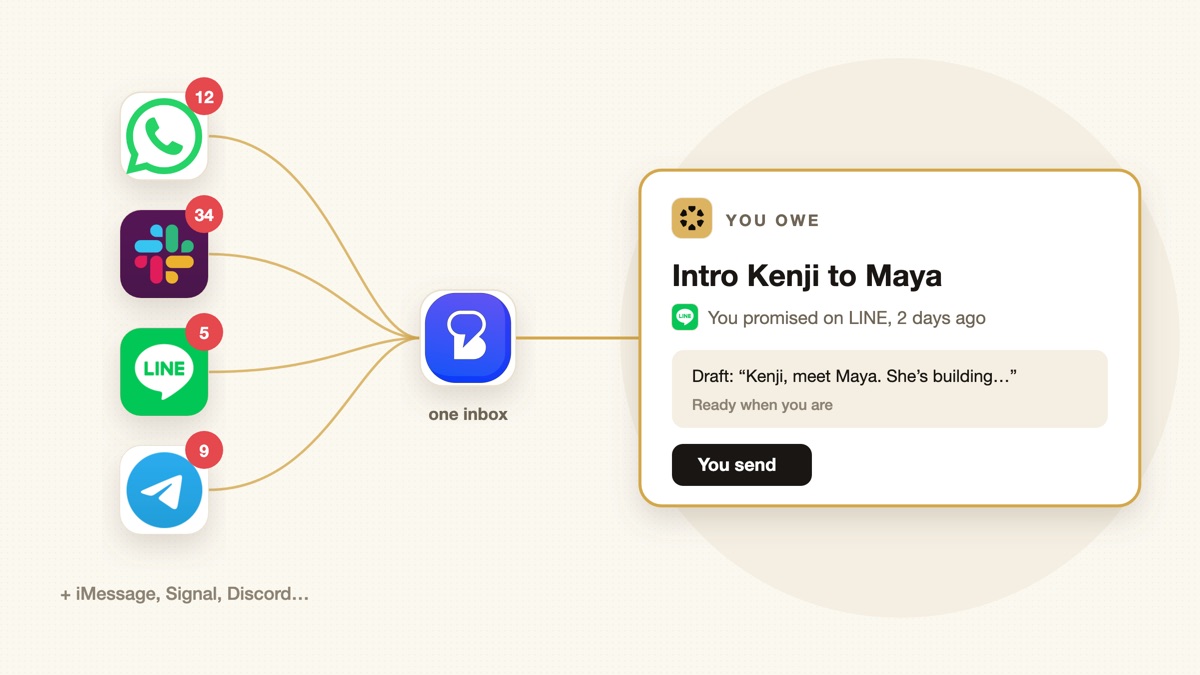
Your investor is on WhatsApp, your team is on Slack, your Japanese partners are on LINE, your friends are on iMessage. Every app has its own red badge, and none of them knows what you promised in the others. AI should be able to help with this. Here’s why it usually can’t yet, and the two-step setup that makes it work.
Publisher disclosure: we build Sharick. Beeper is a separate company’s product that we recommend and integrate with. Details checked October 1, 2026.
The problem isn’t volume. It’s scatter.
Most advice about message overload is about email. Chat is worse in one specific way: it’s split across apps that don’t know about each other.
- You check the loudest app, not the most important one. The busy group chat gets your attention; the quiet investor thread doesn’t.
- You hunt for the channel. Was it WhatsApp or LINE where Kenji asked about the intro? Telegram or Signal for that founder?
- Promises vanish. “I’ll send it tonight” in a chat creates no task, no email, nothing to remind you. It just scrolls away.
Why your AI assistant can’t help with chats (yet)
ChatGPT, Claude and Gemini can connect to email, calendars and, on some plans, Slack. Personal chat apps are different: WhatsApp, LINE, Signal and iMessage are usually out of reach, so the AI never sees the conversations where many promises are made. Even when it can see one app, it sees only that app.
So the order matters: first get every chat into one place, then let AI work on that one place.
Step 1: get every chat into one app (Beeper)

- NetworksWhatsApp, Telegram, Signal, LINE, Slack and more
- Freeup to 5 accounts
- Plusfrom $9.99/month
When I recommend Beeper to other founders, the reaction is almost always relief. One app, every chat. I turned off every other messaging app.
What it does: Beeper puts your chats from WhatsApp, Telegram, Signal, LINE, Slack, Discord, Instagram, Messenger, LinkedIn, Google Chat, X and Google Messages (SMS and RCS) into one inbox. On Mac, it can also include iMessage.
Privacy: with Beeper’s on-device connections, messages go directly from your device to each network, preserving end-to-end encryption where the network supports it. Beeper says chat history isn’t sent to its servers.
Price: free for up to 5 accounts. Beeper Plus starts at $9.99 a month for more accounts and features like reminders, scheduled send and AI voice-note transcription. See Beeper’s FAQ.
Other ways to cope
- Notification rules per app: mute everything except a few people. Free, but you still check seven apps.
- Move business chats to one platform: Slack Connect or email for anything work-related. Works until a key person refuses to switch.
Both help with noise. Neither helps you remember what each conversation needs from you.
Step 2: let AI keep track of what each chat needs from you

Beeper solves reading. It doesn’t solve remembering. That’s where Sharick connects. With its Beeper integration, Sharick captures the messages you send and receive, across every network Beeper supports, and:
- Knows who sent it. Sharick’s People feature links a person’s WhatsApp, LINE and email into one profile, so you never have to remember which app someone uses. Tell Sharick about your relationship with them, and it remembers.
- Catches what you owe and who you’re waiting on, and brings them into the same daily briefing as your email and meetings.
- Drafts the reply for you. Sharick writes the draft; you send it yourself. That’s deliberate: nothing goes out under your name without you.
Set it up
- Install Beeper and connect your chat accounts.
- In Sharick Desktop, open Settings → Integrations → Beeper. Sharick creates a revocable token and runs a small forwarder on your own Mac, keeping it up to date.
- Running Beeper on another machine? An advanced option sets up forwarding on a Linux computer over SSH.
Your control: Sharick never connects to your chat accounts directly. The forwarder on your machine pushes messages in with a token you can revoke anytime, and you can delete the saved chat data whenever you want. Beeper is third-party software; you decide whether to trust it.
The result
- One app to read every chat (Beeper).
- Notifications off everywhere else.
- No more hunting for the app a person uses (Sharick People).
- One AI briefing that knows what you promised, in any app, plus your email and meetings, with replies drafted for you to send (Sharick).
Same idea for the rest of your day: see multiple email accounts and meeting note takers.
Sources and limitations
- Beeper FAQ and TechCrunch on Beeper’s on-device relaunch. Supported networks and prices may change.
- Sharick docs: Beeper chat capture