

Every AI note taker now produces a good summary. The difference is how it captures the conversation, and what happens to the promises in it once the meeting ends.
Publisher disclosure: we build Sharick, one of the products below. This guide compares official product information and reputable coverage checked on September 30, 2026. It is not a hands-on benchmark.
The short answer

tl;dv records Zoom and Google Meet on its free plan, with CRM sync on paid plans.
Records the call
Granola, Sharick, or Notion AI Meeting Notes if your team already lives in Notion.
Invisible to others
Omi if you want open source and integrations, Plaud if you want a polished recorder with a free transcription allowance.
Goes where you go
Captures meetings itself, works with the note taker you already use, and keeps your promises in view.
Makes sure it happensThree ways to capture a meeting
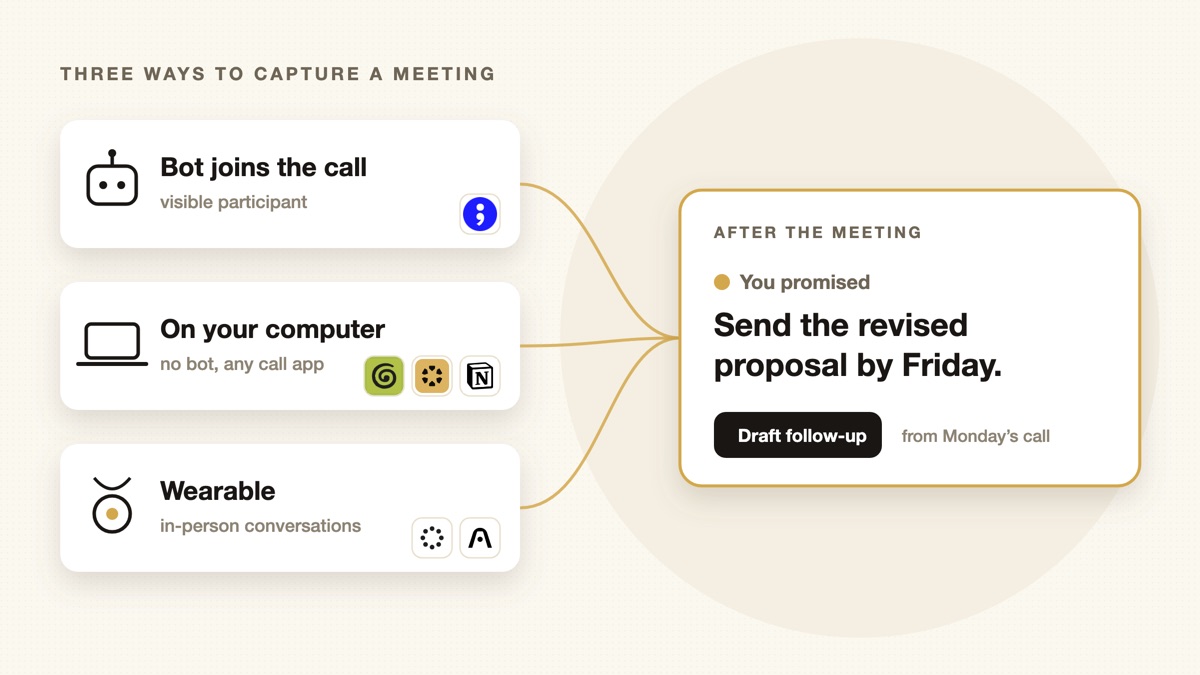
How a tool listens decides where it works.
| Bot joins the call | No bot, on your computer | Wearable | |
|---|---|---|---|
| Products | tl;dv | GranolaSharickNotion | OmiPlaud |
| Visible to others | Yes, as a participant | No | No, it’s a device you wear |
| Works for | Scheduled video calls | Any call your computer can hear | In-person meetings, hallways, phone calls |
| Main trade-off | Some people dislike bots | Desktop only; you start it | Another device to charge; ask for consent |
Bot joins the call
tl;dv
- CapturesZoom, Google Meet; Teams on paid plans
- Free planunlimited recordings
- PaidCRM sync, sales coaching
A meeting recorder that joins your calls as a participant. Its free plan records unlimited meetings in Zoom and Google Meet with limited AI summaries; paid plans add unlimited summaries, CRM sync and sales coaching. A strong fit for sales and customer-facing teams who want recordings and CRM updates. See tl;dv.
No bot, on your computer
Granola
- Capturesmic and system audio
- Free planlimited history
- Business$14 per user per month
An AI notepad, not a bot. You type rough notes during the call; Granola listens through your microphone and system audio and turns your bullets into full notes. Nobody else sees a participant join. The Business plan adds unlimited history and integrations such as Notion, Slack and HubSpot. See Granola.
Sharick
- Captureson your computer, any call app
- Also readsGemini notes, Omi
- After the callcommitments into your briefing
Like Granola, Sharick captures meetings from your computer, with no bot joining the call. Because the capture happens on your side, it works with any call app: Google Meet, Zoom, Teams or anything else your computer can hear. The difference is what happens next: commitments and asks from the meeting go into your daily briefing, linked to the moment they were said. More in after the meeting.
Notion AI Meeting Notes
- Capturesfrom the desktop app
- Outputa Notion page
- PlanBusiness or Enterprise
Built into Notion: start recording from the desktop app, and a transcript, summary and action items land on a Notion page. Coverage notes it needs a manual start and is desktop only. Full access comes with Notion’s Business and Enterprise plans. Best if your team’s notes already live in Notion. See Notion AI Meeting Notes.
Wearables for in-person conversations
The commitments most likely to get lost are made in person: over coffee, after a meeting, walking out of a room. No bot or calendar invite is there. That is what wearables are for.
Omi
- Formopen-source pendant
- AppsiPhone, Android, Mac, web
- Pricingone-time device purchase
An open-source AI pendant: the hardware, firmware and app are public, and a plugin ecosystem lets developers build on it. It turns conversations into transcripts, summaries and action items, with no required subscription.
See Omi.
Plaud
- DevicesNote, NotePin, Note Pro
- Free tier300 minutes a month
- Paidmore or unlimited minutes
A family of AI voice recorders for meetings, calls and in-person conversations. Every device includes a free plan with 300 transcription minutes per month; paid plans raise or remove the limit. A good fit if you want a dedicated, polished recorder. See Plaud.
After the meeting: who follows through?
Every product above can tell you what was said. Fewer help with what happens next. “I’ll send the revised proposal by Friday” is a commitment with an owner and a date, and on Friday a summary from Monday doesn’t remind anyone.
That is the job Sharick is built for. It captures meetings three ways:
- Its own capture on your computer, with no bot joining the call, in any call app.
- Google Meet’s Gemini notes: if you already use Gemini note-taking, Sharick reads the notes and turns them into minutes. Nothing new to install.
- Omi’s real-time feed, for in-person conversations.
Then it does the part a note taker doesn’t: it picks out what you promised and what others asked of you, keeps each one linked to its source, brings the open ones into your daily briefing, and drafts follow-ups for you to approve. Nothing goes out without you.
So you don’t have to choose between your note taker and Sharick. Keep the one you like for capture, and use Sharick for follow-through. More in an AI assistant that follows up for you.
How to choose
- Where do your important conversations happen? Video calls, in person, or both. That picks the group.
- Will a visible bot cause friction? With clients or candidates, a botless tool may be the safer choice.
- Ask for consent. Recording laws vary by place. With any tool, and especially a wearable, tell people you’re recording.
- Test follow-through, not just summaries. After a week, count the commitments from your meetings that actually got done.
Sources and limitations
Checked September 30, 2026. Features, plans and prices change often; verify before you buy. Where sources disagreed on a price, we left it out.
- tl;dv, Granola, Notion AI Meeting Notes, Omi and Plaud: official product and pricing pages
- Sharick: proactive assistant overview