

On September 29, OpenAI launched dots: always-on agents inside ChatGPT, each with its own cloud computer, that keep working toward your goals between conversations. Within a day, the most common question on Reddit was not “what can it do?” but “isn’t this just a worse OpenClaw?”
It is a fair question, and the answer depends on what you want an always-on agent for. Below, we compare dots with the three alternatives people keep naming: OpenClaw, Meta’s Muse and xAI’s Grok Bot.
Publisher disclosure: we build Sharick, which is not an always-on agent of this kind; we cover where it fits at the end. This guide compares official announcements and documentation checked on September 30, 2026. It is not a hands-on benchmark, and every product here is days to weeks old.
The short answer

The easiest start if you already pay for ChatGPT Pro or Business Premium and work in ChatGPT, Slack or Teams.
Lives where you work
The choice if you want control: any model, your own server, and you are comfortable running it.
You run it
The cheapest way to try an agent for everyday life admin, with a free tier.
Does errands for you
Several specialized bots that coordinate and work in parallel today.
A team of botsDots, OpenClaw, Muse and Grok Bot side by side
| OpenAI dots | OpenClaw | Meta Muse | Grok Bot | |
|---|---|---|---|---|
| Launched | Sep 29, 2026 | Open-source project | Sep 2026 | Aug 11, 2026 (beta) |
| Model | GPT-6 Astra | Your choice (cloud or local) | Meta’s models | xAI’s Grok models |
| Where it runs | Its own cloud computer and browser | Your own machine or server | A secure cloud VM with its own browser | Cloud computers for the bots |
| Where you talk to it | ChatGPT (incl. voice calls), Slack, Teams | Chat apps you connect, such as Telegram, Discord, WhatsApp | Muse app, WhatsApp | Grok Bot desktop and mobile apps |
| Agents at launch | One primary dot; more planned | As many as you configure | One personal agent | Several bots that coordinate |
| How you get it | Included with ChatGPT Pro or Business Premium | Free software; you pay for hosting and model usage | Free tier plus paid plans | With SuperGrok or eligible Cursor plans |
| Guardrails | Read-only background work; consent for sensitive actions; automated review | Whatever you configure | Separate “Sentinel” check on outbound actions; audit trail | Bots return for approval |
| Limits to know | Pro excludes EEA, UK, Switzerland at launch | You own setup, security and updates | US only | Beta |
OpenAI dots: an agent where you already work
- LaunchedSept 29, 2026
- ModelGPT-6 Astra
- Lives inChatGPT, Slack, Teams
- Priceincluded with Pro, Business Premium
Dots are OpenAI’s bet that the agent should live inside ChatGPT and the chat tools you already use. Each dot has its own cloud computer, learns from your feedback, and can connect to more than 4,000 apps through plugins. You can message or call it in ChatGPT, or message it in Slack and Teams. OpenAI describes early internal use in procurement, invoice processing, email marketing, customer support and contracting.

The guardrails are the interesting design choice. When it works in the background on its own initiative, a dot has read-only access to your connected apps. Sensitive actions, such as changing passwords or permanently deleting data, need explicit consent, and account-affecting actions go through an automated review.
Consider it if you already pay for ChatGPT Pro or Business Premium and outside the regions excluded at launch. Hesitate if you want to choose the model or host it yourself. See OpenAI’s announcement and privacy and safety FAQ.
OpenClaw: the do-it-yourself agent
- Licenseopen source
- Runs onyour machine or server
- Modelyour choice
- Pricehosting + model usage
OpenClaw is an open-source agent runtime you host yourself. It runs as a long-lived service on your own machine or server, connects to the model provider you choose, including local models, and talks to you through chat apps such as Telegram, Discord and WhatsApp. That is exactly why Reddit compared it to dots: more control, any model, your own infrastructure.
The trade is responsibility. You set it up, decide what it may access, keep it updated and secure, and pay separately for hosting and model usage. An agent with shell access on your machine deserves careful permissions.
Consider it if you want control and are comfortable running a server. Hesitate if you want someone else to own security and reliability. See AWS’s OpenClaw on Lightsail announcement and DigitalOcean’s overview.
Muse and Grok Bot: life admin and a team of bots
Meta Muse
Meta’s Muse is aimed at everyday life rather than office work: errands, bookings, turning saved recipes into grocery lists, and longer personal goals, reachable from its app and WhatsApp. A separate Sentinel check reviews outbound actions and you get an audit trail. It has a free tier and is US only.
Grok Bot
xAI’s Grok Bot treats agents as a team: several bots with cloud computers that coordinate, learn a workflow by demonstration and repeat it. It comes with SuperGrok and eligible Cursor plans and is still in beta.
We covered both in more depth in our guide to personal AI agents.
The question none of them answers: who manages the handbacks?
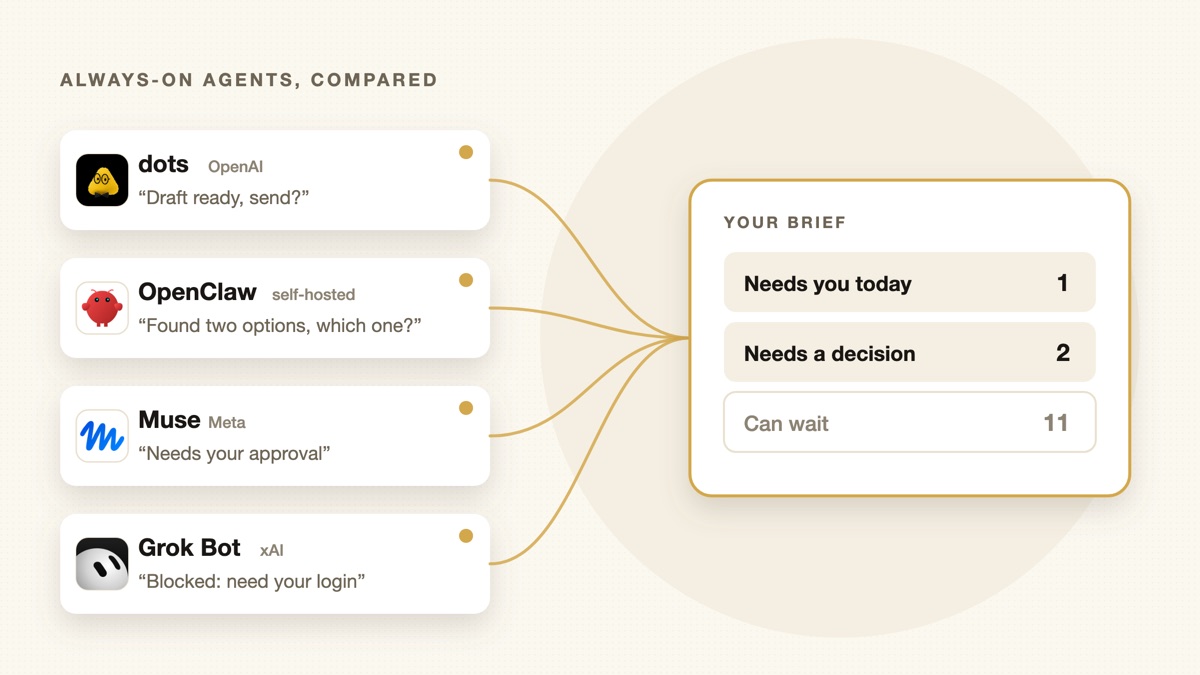
OpenAI pitches dots as a way to get “more of your time and attention back.” That is the right goal. But notice what an always-on agent does all day: it works, and then it comes back to you. “Draft ready, send?” “I found two options.” “Needs your approval.” One agent is manageable. A dot, an OpenClaw instance, a coding agent and a few scheduled jobs, all reporting in their own format, is a queue with you at the end of it.
In one of the Reddit threads about the launch, a commenter noticed an agent that had set itself up to poll for nothing every 20 minutes, indefinitely. That is the always-on problem in miniature. Running forever is easy. Deciding what deserves a human’s attention is hard.
That second job is what we build Sharick for. It is not another always-on worker. It sits between you and everything reporting to you, keeps the context behind each item, and brings you a short briefing: what needs you today, what needs a decision, and what can wait. We wrote about why in AI isn’t the bottleneck anymore. Your brain is.
How to choose
- Start with what you already pay for. If you have ChatGPT Pro, try a dot before paying for anything else.
- Give it one bounded, reviewable task. A weekly report, an inbox you monitor, a follow-up you keep forgetting.
- Count the handbacks. After a week, how many times did it come back to you, and how many of those were worth it?
- Check control before scale. Know which actions it takes alone before you run more than one.
Sources and limitations
We reviewed official announcements, help pages and reputable coverage on September 30, 2026. Details, plans and regions are changing quickly; verify before you subscribe.